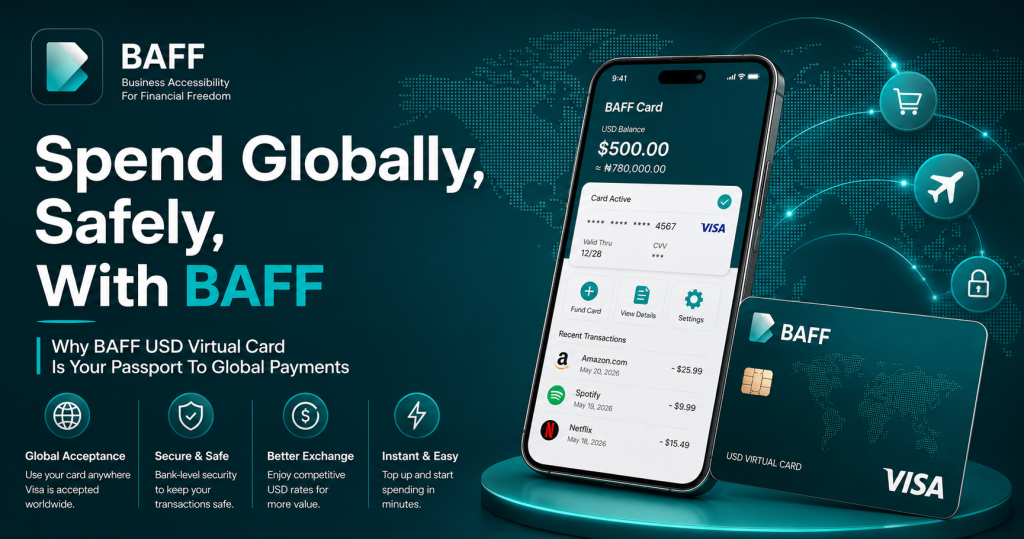
For Nigerians, paying for an international service can sometimes feel harder than using it. A subscription may be priced in U.S. dollars, an advertising platform may require an internationally enabled card, or an online store may reject a local debit card at checkout. When a payment fails repeatedly, the problem is not always your balance. It may be the card’s currency, merchant rules, billing details, or restrictions on international transactions.
The BAFF USD Virtual Card is designed to make eligible global online payments simpler for users in Nigeria. It gives you a digital dollar card that you can fund from your Naira wallet and use for selected international subscriptions, online shopping, advertising, software, and education platforms. BAFF describes the card as a secure digital dollar card created for Nigerians who need reliable access to international payments.
This guide explains how the BAFF USD Virtual Card works, what you can use it for, how to create one, what it costs, and how to use it more safely. It also explains an important limitation: no virtual card is accepted everywhere. Merchant policies, prepaid-card rules, billing information, available balance, and network restrictions can still affect a transaction.
What is the BAFF USD Virtual Card?
A virtual card is a digital payment card rather than a physical plastic card. It normally has card details such as a card number, expiry date, and CVV that can be entered at online checkout. Google’s payment guidance explains that virtual card numbers can replace an actual card number when paying online or in apps, helping reduce the exposure of the underlying card information.
The BAFF USD Virtual Card is positioned for everyday international spending from Nigeria. Instead of relying only on a local Naira card at a dollar-denominated checkout, you can fund the card through your BAFF wallet and use the available USD balance for eligible online purchases. BAFF specifically highlights international payments, online shopping, subscription payments, and safe transactions as key use cases.
The phrase “passport to global payments” is a useful way to understand the product. It does not mean that every merchant, website, or country is automatically supported. It means the card is intended to help you access a wider range of international digital services without needing a physical dollar card in your wallet.
Why Nigerians use a USD virtual card for international payments
Many international platforms bill in U.S. dollars even when the customer is located elsewhere. Streaming services, cloud tools, advertising networks, software platforms, course providers, and online stores may also apply merchant or card-acceptance rules that cause some local cards to fail.
A USD virtual card can help by giving the merchant a card designed for online dollar transactions. It can also make spending easier to separate: you may keep only the amount needed for a subscription, campaign, purchase, or software renewal rather than exposing the balance of another primary card.
BAFF’s Nigeria-focused guide identifies practical use cases including Netflix, Spotify, Amazon, Shein, Facebook or Meta Ads, Google Ads, ChatGPT, Canva, Adobe, Coursera, Udemy, and other course platforms. Acceptance is still determined by the merchant and card-network rules, so users should treat these examples as common use cases rather than a guarantee of approval for every account or transaction.
What can you pay for with the BAFF USD Virtual Card?
The card is most useful when your payment is online, denominated in U.S. dollars, and accepted by the merchant’s payment system. The table below summarizes the main categories.
| Payment category | Examples | Practical note |
| Subscriptions | Streaming, music, productivity, and other recurring services | Keep a small balance buffer so renewals do not fail because of a minor price or authorization difference. |
| Digital advertising | Facebook/Meta Ads, Instagram campaigns, and Google Ads | Advertising platforms can apply their own verification, billing, and prepaid-card rules. |
| Software and AI tools | Design, productivity, cloud, and AI subscriptions | Confirm the billing name and address format required by the platform. |
| Online shopping | International marketplaces and eligible e-commerce stores | Some merchants block prepaid or virtual cards, even when the card details are valid. |
| Education | Online courses and learning platforms | Check whether the provider accepts virtual Visa or prepaid cards before funding a large amount. |
The safest approach is to start with the exact amount you need, confirm the merchant’s billing requirements, and monitor the transaction in the BAFF app. For recurring services, keep enough additional balance to cover renewal timing, temporary authorization holds, or a small price change.
How to create a BAFF USD Virtual Card in Nigeria
Creating the card is designed to be a straightforward in-app process. BAFF’s official guide says you need a smartphone, a verified BAFF account, Naira in your BAFF wallet, a valid phone number, and government identification for verification.
First, download the BAFF app from the official BAFF download page. Create your account and complete the required verification. Next, fund your BAFF wallet with Naira using the available funding method. Inside the app, open the Cards section and select the option to create a USD Virtual Card. Fund the card from your wallet, review the displayed exchange rate and applicable charges, and then use the card details at an eligible online checkout.
BAFF states that most users can be ready in minutes, but setup time can vary depending on verification, funding, network conditions, and account review. Do not share your card number, CVV, PIN, one-time passwords, or login details with another person claiming to represent you.
How much does the BAFF USD Virtual Card cost?
According to BAFF’s official product page and Nigeria guide, creating the USD virtual card is free, while a one-time $2 usage fee applies when the card is activated for spending. The guide also notes that bank-transfer fees may apply and that the Naira-to-USD exchange rate is shown in the app before confirmation.
Because prices, limits, exchange rates, and eligibility rules can change, review the final amount displayed inside the BAFF app before completing a transaction. The fee table below is a concise summary of the currently published information, not a substitute for BAFF’s live in-app pricing.
| Item | Published guidance | What to check before paying |
| Card creation | Free | Confirm that the current app flow still shows no creation charge. |
| Card activation or usage | One-time $2 fee | Check when the fee is applied and the exact currency or equivalent shown in-app. |
| Wallet funding | Bank-transfer fees may apply | Confirm whether your bank or funding route adds a separate charge. |
| FX conversion | Rate displayed before confirmation | Review the total Naira amount, rate, and final USD balance before confirming. |
Why the BAFF USD Virtual Card can be a safer way to pay online
Security is not only about the card being virtual. It is also about how you control access, how much money you keep available, and how carefully you verify a merchant before paying.
BAFF says transactions are protected with PIN and biometric authentication and that card details are encrypted. Those controls can make a digital payment experience more convenient, but users still need to follow basic security practices. Use the official BAFF app, protect your phone, enable device security, avoid public or suspicious Wi-Fi when handling financial information, and never disclose verification codes.
A virtual card can reduce the need to provide a primary card number directly to every online merchant. However, Google notes that virtual cards are not supported by every merchant or app, and availability can depend on the issuer, network, and country. For that reason, the BAFF USD Virtual Card should be viewed as a practical risk-control and payment-access tool, not as a promise of universal acceptance or complete fraud protection.
How to avoid declined transactions
A declined payment is frustrating, but it is often fixable. Start by checking that your BAFF USD balance is enough to cover the purchase, including any temporary authorization amount or recurring-payment buffer. Then confirm that the merchant accepts prepaid or virtual Visa cards. Some platforms reject these card types even when the account is active.
Next, check your billing information. The name, address, country, and postal-code format entered at checkout should match the information associated with your BAFF profile or the merchant’s requirements. BAFF also advises users to turn off VPNs that change the apparent billing country, because a mismatch between the user’s location, billing profile, and card country can trigger a decline.
If the charge is recurring, verify that the card has enough balance on the renewal date. If a transaction still fails, avoid repeated attempts in quick succession and contact BAFF customer support through the official support channels. The BAFF Help Center lists email, phone, website chat, and in-app chat options.
BAFF USD Virtual Card compared with a regular local debit card
A regular local debit card may be ideal for domestic purchases, ATM access, and merchants that accept Naira payments. A USD virtual card is more focused: it is designed for eligible online payments where the merchant expects a dollar-denominated or internationally enabled card.
The right choice depends on the transaction. Use the payment method that offers the clearest pricing, the correct currency, the best acceptance, and an appropriate level of control. A virtual card is not automatically cheaper than every alternative, and it should not be used to bypass a merchant’s identity, location, or payment rules.
| Consideration | Local Naira debit card | BAFF USD Virtual Card |
| Primary use | Domestic and local payments | Eligible international online payments |
| Currency context | Usually Naira at checkout | USD balance for dollar-denominated transactions |
| Physical form | Usually physical card, sometimes paired with digital access | Digital card intended for online use |
| Best fit | Local purchases and everyday domestic spending | Subscriptions, ads, software, shopping, and courses that accept it |
| Main limitation | May be declined by some international merchants | May be rejected by merchants that block virtual or prepaid cards |
Smart habits for spending globally, safely
Treat your virtual card like a financial instrument, not like a disposable password. Fund only what you need for the immediate purchase or billing cycle, and review your transactions regularly. For subscriptions, keep a calendar of renewal dates so you can maintain the correct balance and cancel services you no longer use.
Before entering card details, verify that the website address is correct, the connection is secure, the merchant is reputable, and the checkout amount matches the advertised price. Avoid sending card screenshots through social media or messaging apps. If you believe your card details have been exposed, use the BAFF app or official support channels promptly.
Finally, read the live terms, pricing, limits, and supported-merchant information before relying on the card for an important payment. BAFF’s official product page and guide are useful starting points, while the app remains the best place to confirm the amount you will actually pay.
Final verdict: Is the BAFF USD Virtual Card worth considering?
For Nigerians who regularly pay for international subscriptions, digital advertising, software, online shopping, or education, the BAFF USD Virtual Card is a convenient option to investigate. Its main value is the combination of a digital dollar payment method, Naira wallet funding, and a workflow designed around common international-payment problems.
It is not a universal passport in the literal sense: merchant acceptance, verification, exchange rates, card limits, and payment rules still apply. Used responsibly, however, it can give you a more controlled way to spend globally and reduce dependence on a single local card for every international checkout.
If you are ready to explore it, begin with the official BAFF USD Virtual Card page, review the current terms and in-app charges, and create your card only through the official BAFF app or download channel.
Frequently asked questions
Is the BAFF USD Virtual Card available to Nigerians?
BAFF markets the USD Virtual Card specifically for Nigerians. You should complete the current account-verification process and confirm your eligibility in the BAFF app before funding or using the card.
Can I use the BAFF card for Netflix, Facebook Ads, or Google Ads?
BAFF lists Netflix and Facebook Ads on its product page and identifies Facebook/Meta Ads and Google Ads among the use cases in its Nigeria guide. Acceptance can still depend on the merchant’s current billing and prepaid-card policies.
Is creating the card free?
BAFF currently states that card creation is free, while a one-time $2 usage fee applies when the card is activated for spending. Check the live in-app amount before confirming because fees and terms may change.
Why was my BAFF USD card payment declined?
Common reasons include insufficient USD balance, a merchant blocking prepaid or virtual cards, VPN-related location mismatches, or incorrect billing details. Check those items first, then contact BAFF support if the issue continues.
Is a virtual card completely safe?
No payment method is completely risk-free. BAFF states that its transactions use PIN and biometric authentication and that card details are encrypted. You should still protect your device and login, avoid sharing card details, verify merchants, and monitor transactions. Virtual-card acceptance and availability can also vary by merchant, issuer, network, and country.